Information about cheat
Phoenix / Satano for Palworld — a powerful private trainer with high stability and Undetected status since the game’s release. The software is perfect for comfortable PvE gameplay and for speeding up character, base and pal progression without unnecessary grinding. The product includes high‑quality ESP for players, pals, mobs and resources. Visuals support health, levels, distance, skeletons, boxes and visibility checks with separate color indicators. A flexible Loot ESP is also implemented with filters for resources, treasures, eggs and other useful items. One of the most convenient features is the Object Manipulator — a type of magnet for items, resources and objects, allowing you to quickly gather everything you need around the character. Fullbright, Rapid Fire, Infinity Ammo, Infinity Durability, Insta Craft, SpeedHack, Increased Damage and many other functions are also available for comfortable gameplay. Additionally, the software allows you to unlock the map, unlock fast travel points, grant Tech Points, disable item weight and configure experience gain. Server Mode, Developer Mode and flexible ESP color customization are supported as well. Phoenix Palworld — a reliable and proven solution for those who want maximum convenience and control in the game without risk or unnecessary complications.
Features
System Requirements
- Operating system: Windows 10, Windows 11 (21H2, 22H2, 23H2, 24H2, 25H2)
- Processor: Intel & AMD
- Video card: Nvidia & AMD
- Client: Steam
Players ESP (Wallhack)
- Enabled – enables Player ESP
- Visible Check – visible and hidden targets are highlighted in different colors
- Names / Level / Distance / Health – shows nickname, level, distance, and HP (text, bar)
- Skeleton – skeleton ESP on players
- Boxes / Boxes Style – displays boxes (2D Box, Corner Box, Filled Box)
- Max Distance – sets maximum ESP working distance
Mobs ESP (Pals)
- Enabled – enables ESP for mobs and pals
- Boxes – displays ESP boxes around pals
- Names / Health / Level / Distance – displays info about mobs
- Targets – filter for displayed creatures (select specific mobs / categories)
- Max Distance – sets the display distance for mobs and pals
Items ESP (Loot)
- Enabled – enables ESP for items lying on the ground
- Filters – specific loot categories (Stone, Wood, Berries, Eggs, Treasures, Other)
- Distance / Max Distance – shows distance and sets maximum range
Object Manipulator (Magnet)
- Field of View – the area in which items will be captured
- Filters – allows selecting specific categories of items and resources
- Magnet – automatically pulls items/mobs and resources to the player
- Key – hotkey setting for activating the manipulator/magnet
Other Phoenix Palworld Features
- Fullbright / Clear Map – illuminates locations and reveals the fog of war
- Infinity Stamina / Ammo / Durability – endless resources and unbreakable items
- Rapid Fire / Increased Damage – fire rate and damage multipliers
- Insta Craft – instant crafting without waiting
- Lightweight Backpack – completely removes weight of carried items
- Exp Points / Apply Tech Points – sets experience and grants tech points
- Speed Modifier (Value) – changes character movement speed (speedhack)
- Unlock All Journals / Effigies / Fast Travels – mass unlockers
- Skip Night – instantly skips the night
- Server Mode / Developer Mode – special features and extended debugging tools
- ESP Customization / Localization – custom colors and English/Russian support
Software Usage Guide
Step-by-step guide for downloading and launching our software:
After payment, you will receive a key to activate access to the cheat, a link to this manual, and a link to the loader.
Preparation:
- Completely disable Windows Defender (real-time protection). If you have other antivirus programs installed, it is recommended to remove them, as they may interfere with the correct launch of the software.
- We strongly recommend disabling Windows Defender using the Defender Control program. Archive password - sordum.
- Completely uninstall the following software through Control Panel: Faceit AC, Riot Vanguard, ACE (AntiCheatExpert). These anticheats prevent our cheats from running. (For ABI and Delta Force, there is no need to remove ACE anti-cheat).
- Some games launched via Steam require a game overlay (Shift + Tab). It is enabled by default, but if you do not have it, activate it in the Steam settings.
Injection Steps:
- Now that everything is ready, download the loader using the link you received.
- Before launching the loader, make sure all games are closed. It is strictly not recommended to run the loader while games are open!
- Run the previously downloaded loader as administrator.
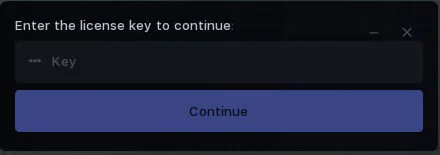
- On the first launch, you will need to activate your key. Paste your key into the "Key" field and click "Continue".
- After a short load, authorization in the loader will occur, and you will see the main tab. Here you can select the software to run, check subscription expiration date and status.
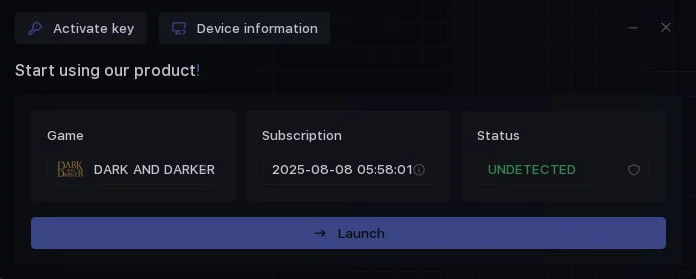
- Now in the "Game" section, select the game you want to launch and click "Launch".
- The cheat launch process will begin, wait for the message "Wait for the game process".
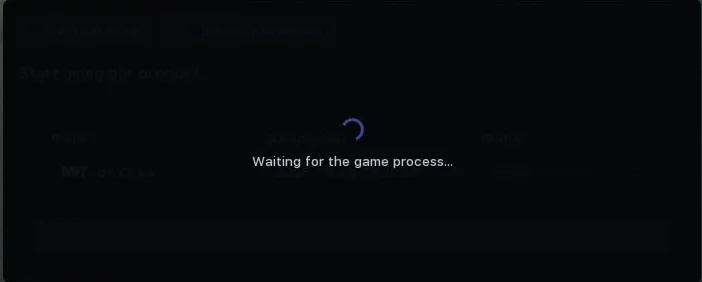
- After the message appears, you need to start your game.
- Injection will occur automatically, and the cheat menu will appear in the main menu of the game.
- Congratulations, you have successfully launched the cheat! Afterwards, the cheat menu can be opened/closed by pressing the Insert key.